On1 Resize V Topaz Gigapixel 2026
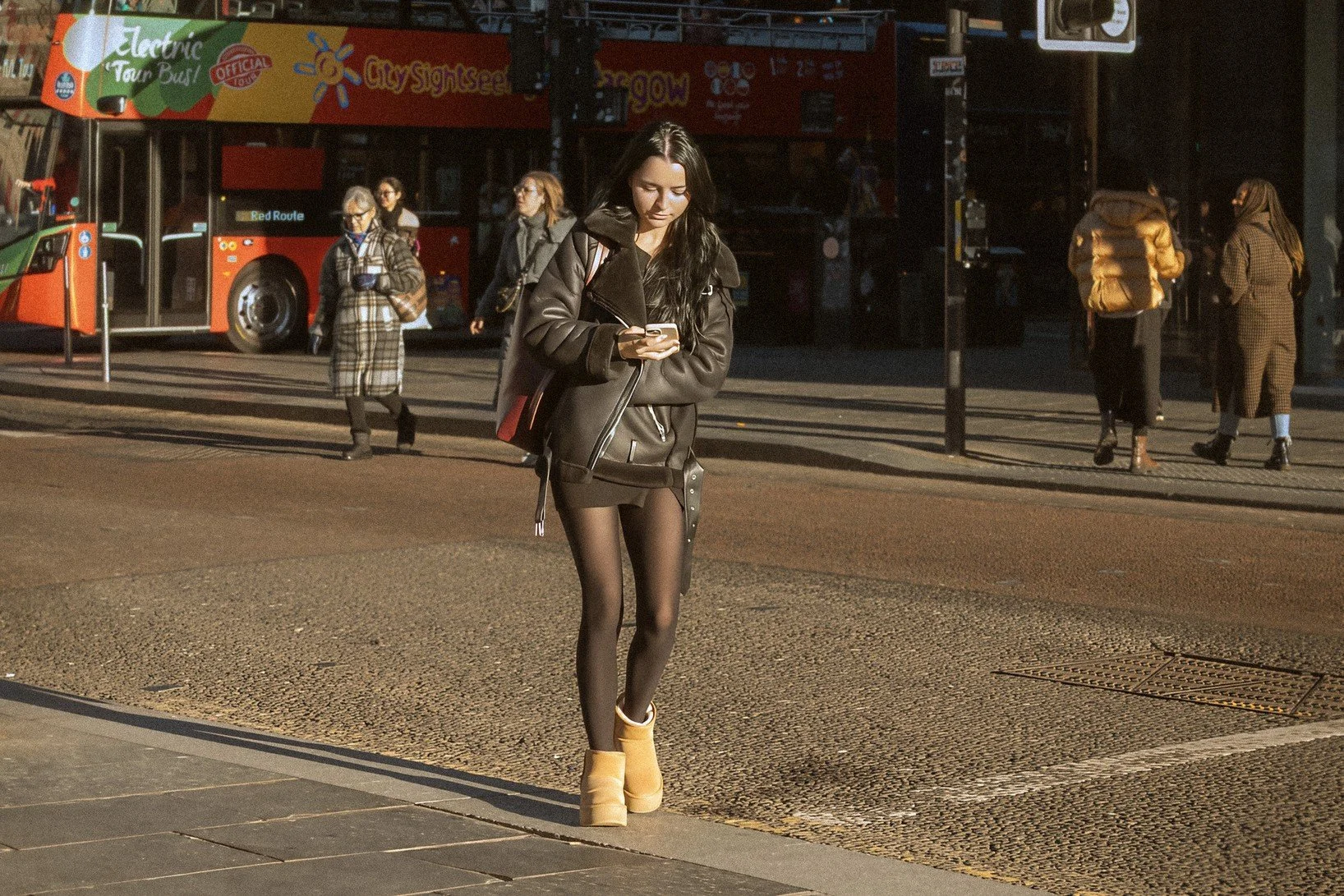
Edited in Gigapixel 2026
I have a lot of images taken years ago, ones that i lost the RAW files in my “Great Hard Drive Disaster of 2020” that are too small to be useful (less than 900px on their long side). There are a lot of pictures amongst those that i really like and would love to be able to post again.
On top of that, doing street photography, I often find i want to really crop in to a specific part of a picture, but with the two cameras i use, there isn’t a huge megapixel count to really allow heavy cropping.
To help with both of these issues i had a look at two AI upcsalers, On1 Resize and Topaz Gigapixel (the most recent versions at the end of 2025). Online reviews (and especially a number of youtube reviews) of both would have you believe that they are gifts from God and both are capable of almost magical results. To be fair, there are also negative reviews, though less common, and the general opinion is that Gigapixel is slightly better but that On1 Resize is very close and actually better at some types of upscaling.
I bought On1 Photo Raw, once i realised that Resize was included, and the price was very reasonable at £50 or so for the full package. I initially decided against Topaz Gigapixel as the subscription costs were too high and it felt far more expensive overall.
It is probably best i don’t comment too much on the rest of the Photo Raw package as i haven’t used it extensively yet (I still have Lightroom) but my first impressions were that it was slow, fiddly and unintuitive. The shadows and exposure sliders are very strange (they brighten the whole image) and there’s a load of not very useful presets that are like something from an “awesome actions” pack from 15 years ago, these can be ignored though. With more practice and experience using it, it might turn out to be a worthwhile purchase. I will review it at a later date.
Lets get back to the Resize function. I loaded up some images and set about upscaling them.
My honest opinion is that it is not very useful as a professional tool. To start with the UI is weird. It is difficult to tell when it is actually doing anything and you have to zoom in and out and move the image around to trigger it to apply whatever settings you used. There are two options available for the model it uses, standard and best quality, this seems pointless as why would you ever use standard when it has no advantage other than a little bit faster to generate. In use though i found very little difference in the final result anyway.
It has face recovery and grain settings, and a number of sharpening settings. Changing these settings seems to have a limited impact, and the results are always much the same, often turning out a mush of distorted faces and garbled background elements. It could be i am doing something seriously wrong, though i watched a number of tutorials and read guides online and i seem to be using it correctly. Even when it does a reasonable job of any primary face in an image (the face recovery option does work ok some of the time), faces in the background can be distorted in the most bizarre ways.
I tried about 10 different images, some of my low res landscapes and model photos, and then my heavily cropped street photos. In both instances, i found the results (at 2 and 4 times upscale) to be disappointing. It doesn’t often do a good job of figuring out what it should do with missing detail, and the AI generated details are not accurate. It often looks just like an AI generated image, complete with the nonsense text and plastic textures. From my 10 sample images, there were only two or three where i did get something, that with extra correction and applying heavy grain in Photoshop afterwards, i could probably post and they wouldn’t look too bad.. Everything else i tried i had to discard. Some results weren’t awful, they just didn’t hold up to any close inspection. On a phone screen or a small print you could get away with some of them, but as soon as you zoom in then too many flaws become apparent.
I was a bit shocked, especially after the youtube reviews, but i can only comment on what i found. Could it be user error? Possibly, maybe there is something basic that i am doing wrong, but from what i can tell, and in my own opinion, it is not suitable for serious use in most cases. As something to play around with and make slightly AI looking versions of old photos, it has some merit, but not as a way to upscale low res photos for serious/professional use. I find it might be best for taking already decent sized images and making them larger, for printing purposes. This might be its strength rather than fixing low res, pixelated images. I would also say it is better at landscapes than portraits/street photos. For Landscape photos it actually got some results that looked ok, not great, but passable. If you just want an “ok” larger version of an otherwise hopelessly small image, it can do the job just about.
And so i reluctantly tried Topaz Gigapixel. At nearly £30 for one month i was not amused (it is cheaper if you pay for a year at once), but i had to see if it performed better than On1 Resize. The good news is, it does, in fact it surpassed my (admittedly low) expectations.
If you stick to the basic models (Low Res and Standard and High Fidelity) and the new “Wonder” AI model, then it generally does a decent job. It has a nice compare function that lets you choose two models and see side by side how they look, and you can make changes to the settings and see immediate results (this does not apply to the “Generative AI” models such as Wonder and Resize which only show a small preview or no preview). The upscaled versions look more natural than On1 Resize, and the face recovery option is significantly better. There are other Generative AI models though i found those either very similar to Wonder, or overall not as good.
From the same 10 sample images, 8 were usable after upscaling in Gigapixel. There are still problems, certain textures get turned into cartoon plastic effects, eyes don’t always end up looking right, and hair and trees can end up quite mushy, but lowering the denoise and adding a bit of grain can generally hide or even solve a lot of these issues. From the 8 images that did work, i still did a little fixing in Photoshop on a couple of them (mostly cloning out some of the weirder AI elements after the upscale) but overall i was quite impressed with the results.
The basic models all do a decent job (Standard and Low Res, i found i didn’t use High Fidelity much), though they will have problems on very small images that have a lot of indistinct details. The Wonder model sometimes gives fantastic results on these same images, and it recreates the missing detail with surprising accuracy, on the other hand though, it sometimes gives terrible often humorous results, but i suppose that’s what you get with generative AI. I found the low res model to the best overall, and it gave me a result i was happy with more often than not when dealing with small sized original images.
To sum up:
On1 Resize. The pricing is good, no subscription required, there’s a lot in the whole Photo Raw package and the Resize model does an ok job on some things. However, it is too inaccurate overall when restoring missing detail and often ends up looking more fake/plastic than realistic. The UI could do with some changes and it needs some way to let you know whats going on at times. The face recovery does work, though it is pretty hit and miss. It will be interesting to check back in a year and see how it has progressed. Also, once i get into the rest of the Photo Raw package i might find that the Resize option isn’t the main thing to use it for, hopefully it will be a reasonable alternative to Lightroom in some ways. It isn’t terrible, it just isn’t good enough for my purposes, I want a final image that stands up to zooming in and looking reasonably realistic.
Topaz Gigapixel. It is too expensive, there is no stand alone pricing model, it is subscription only unfortunately. The results though are decent to very good overall. The image at the top of this page is from a very heavily cropped photo. This was about 25% of the image, and that was on the 16mp Lumix GX80, so it was well under 1000 pixels on both sides. This was a 4 times upscale, though shrunk back down for posting here, the difference between this and the original is quite impressive. There are still a couple of “AI” looking things (her boots lack detail for example), but it turned a useless image into one that i am actually happy to post, so for that i have to recommend it. In the original image her face is very pixelated, and in this upscale you can’t see any pixelation at all (the added grain does also help though).
Resizing as a process overall though still seems to have a way to go though. I have tried multiple methods for this now and none of them are perfect, or even close to perfect in some use cases. The upscaling in Photoshop and Lightroom is very basic (not counting the new AI additions). The free software is mostly awful (UPSCAYL is maybe one of the better ones but it is still not good for serious use). Between these two, Gigapixel is out in front (except when it comes to pricing), On1 Resize is better than the free options, and more useful than what’s in Photoshop but falls short of being a serious contender. I recommend Gigapixel if you have to use one. I applaud On1 though for still doing stand alone pricing models, so i really do hope they can improve things with time.
On1 Resize: 5/10
Gigapixel: 7.5/10